Eerder schreef ik over StirlingPDF wat een web-applicatie is voor het bewerken en beheren van PDF documenten. Wil je echter een nog uitgebreidere suite met tools dan kun je het beste overschakelen naar BentoPDF.
Installatie is het eenvoudigste via een Docker container. Maak een ‘docker-compose.yml’ file aan met de volgende inhoud:
services:
  bentopdf:
    image: ghcr.io/alam00000/bentopdf-simple:latest
    container_name: bentopdf
    ports:
      - '3015:8080'
    restart: unless-stopped
    environment:
      - TZ=Europe/Amsterdam
    healthcheck:
      test: ['CMD', 'wget', '--spider', '-q', 'http://localhost:8080']
      interval: 30s
      timeout: 10s
      retries: 3
Start vervolgens de container op met het commando ‘docker compose up -d’. Ga hierna met je internet browser naar
http://localhost:3015
Je krijgt nu het volgende scherm te zien waar je kunt instellen welke acties gerelateerd aan een PDF file je wilt uitvoeren.
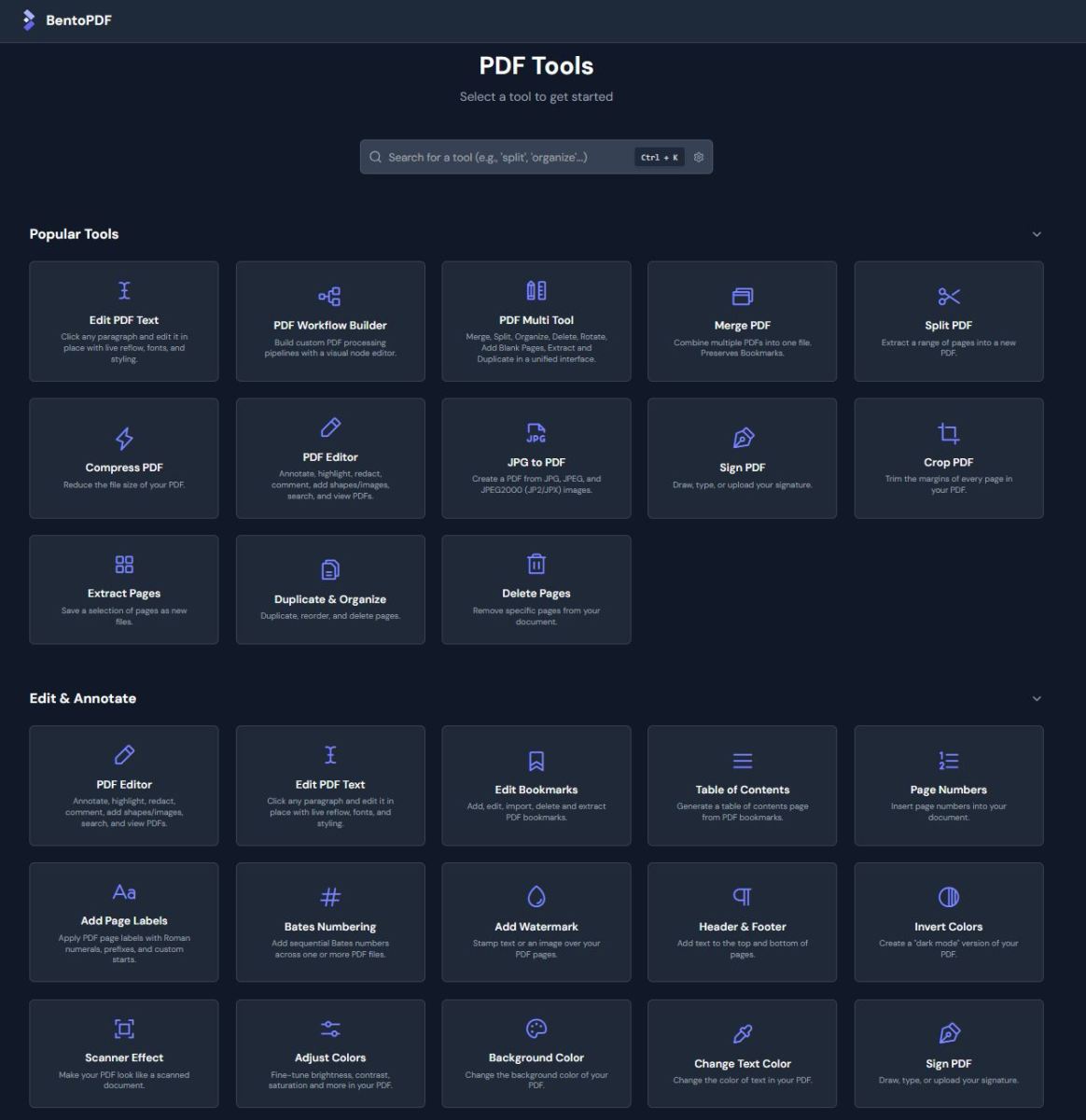
Dit is slechts een klein gedeelte van de tools die allemaal in de BentoPDF tool zitten. De gehele lijst bestaat aan de volgende tools:
Converteer naar PDF
Zet afbeeldingen, documenten, e-books en andere bestandsformaten om naar PDF.
- Images to PDF — Convert JPG, PNG, BMP, GIF, TIFF, SVG, HEIC, WebP and more to PDF.
- JPG to PDF — Create a PDF from one or more JPG images.
- PNG to PDF — Create a PDF from one or more PNG images.
- WebP to PDF — Create a PDF from one or more WebP images.
- SVG to PDF — Create a PDF from one or more SVG images.
- BMP to PDF — Create a PDF from one or more BMP images.
- HEIC to PDF — Create a PDF from one or more HEIC images.
- TIFF to PDF — Create a PDF from one or more TIFF images.
- Text to PDF — Convert a plain text file into a PDF.
- Markdown to PDF — Convert Markdown to PDF with live preview and syntax highlighting.
- JSON to PDF — Convert JSON files to PDF format.
- ODT to PDF — Convert ODT (OpenDocument Text) files to PDF.
- CSV to PDF — Convert CSV spreadsheets to PDF.
- RTF to PDF — Convert RTF (Rich Text Format) documents to PDF.
- Word to PDF — Convert Word documents (DOCX, DOC, ODT) to PDF.
- Excel to PDF — Convert Excel spreadsheets (XLSX, XLS, ODS) to PDF.
- PowerPoint to PDF — Convert PowerPoint presentations (PPTX, PPT, ODP) to PDF.
- XPS to PDF — Convert XPS/OXPS documents to PDF.
- MOBI to PDF — Convert MOBI e-books to PDF.
- EPUB to PDF — Convert EPUB e-books to PDF.
- FB2 to PDF — Convert FictionBook (FB2) e-books to PDF.
- CBZ to PDF — Convert comic book archives (CBZ/CBR) to PDF.
- WPD to PDF — Convert WordPerfect documents (WPD) to PDF.
- WPS to PDF — Convert WPS Office documents to PDF.
- XML to PDF — Convert XML documents to PDF.
- ODG to PDF — Convert OpenDocument Graphics (ODG) to PDF.
- ODS to PDF — Convert OpenDocument Spreadsheet (ODS) to PDF.
- ODP to PDF — Convert OpenDocument Presentation (ODP) to PDF.
- PUB to PDF — Convert Microsoft Publisher (PUB) to PDF.
- VSD to PDF — Convert Microsoft Visio (VSD, VSDX) to PDF.
- PSD to PDF — Convert Adobe Photoshop (PSD) files to PDF.
- Email to PDF — Convert email files (EML, MSG) to PDF format.
Converteer van PDF
Converteer de inhoud van PDF-bestanden naar afbeeldingen, documenten en gegevensformaten.
- PDF to JPG — Convert each PDF page into a JPG image.
- PDF to PNG — Convert each PDF page into a PNG image.
- PDF to WebP — Convert each PDF page into a WebP image.
- PDF to BMP — Convert each PDF page into a BMP image.
- PDF to TIFF — Convert each PDF page into a TIFF image.
- PDF to CBZ — Convert a PDF into a CBZ (Comic Book Archive) for comic readers and Calibre.
- PDF to SVG — Convert each PDF page into a scalable vector graphic.
- PDF to CSV — Extract tables from PDF and convert to CSV format.
- PDF to Excel — Extract tables from PDF and convert to Excel (XLSX).
- PDF to Greyscale — Convert all colors to black and white.
- PDF to JSON — Convert PDF files to JSON format.
- PDF to Word — Convert PDF files to editable Word documents.
- Extract Images — Extract all embedded images from your PDF files.
- PDF to Markdown — Convert PDF text and tables to Markdown format.
- Prepare PDF for AI — Extract PDF content as LlamaIndex JSON for RAG/LLM pipelines.
- PDF to Text — Extract text from PDF files and save as plain text.
- Extract Tables — Extract tables from PDFs as CSV, JSON, or Markdown.
Organizeer en Beheer
Herschik, voeg samen, splits en beheer je PDF-pagina’s en -bestanden.
- PDF Workflow Builder — Build custom PDF processing pipelines with a visual node editor.
- PDF Multi Tool — Full-featured PDF editor with page management.
- OCR PDF — Make a PDF searchable and copyable.
- Merge PDF — Combine multiple PDFs into one file.
- Alternate & Mix Pages — Merge PDFs by alternating pages from each PDF.
- Duplex Collate — Reorder front/back scan blocks into proper page sequence.
- Organize & Duplicate — Duplicate, reorder, and delete pages.
- Add Attachments — Embed one or more files into your PDF.
- Extract Attachments — Extract all embedded files from PDF(s) as a ZIP.
- Edit Attachments — View or remove attachments in your PDF.
- PDF OCG — View, toggle, add, and delete OCG layers in your PDF.
- Split PDF — Extract a range of pages into a new PDF.
- Divide Pages — Divide pages horizontally or vertically.
- Extract Pages — Save a selection of pages as new files.
- Delete Pages — Remove specific pages from your document.
- Add Blank Page — Insert an empty page anywhere in your PDF.
- Reverse Pages — Flip the order of all pages in your document.
- Rotate PDF — Turn pages in 90-degree increments.
- Rotate by Custom Degrees — Rotate pages by any custom angle.
- N-Up PDF — Arrange multiple pages onto a single sheet.
- PDF Booklet — Rearrange pages for double-sided booklet printing.
- Combine to Single Page — Stitch all pages into one continuous scroll.
- View Metadata — Inspect the hidden properties of your PDF.
- Edit Metadata — Change the author, title, and other properties.
- PDFs to ZIP — Package multiple PDF files into a ZIP archive.
- Compare PDFs — Compare two PDFs side by side.
- Posterize PDF — Split a large page into multiple smaller pages.
Optimaliseer en Organizeer
Comprimeer, corrigeer en optimaliseer je PDF-bestanden voor betere prestaties en compatibiliteit.
- Compress PDF — Reduce the file size of your PDF.
- PDF to PDF/A — Convert PDF to PDF/A for long-term archiving.
- Fix Page Size — Standardize all pages to a uniform size.
- Linearize PDF — Optimize PDF for fast web viewing.
- Page Dimensions — Analyze page size, orientation, and units.
- Remove Restrictions — Remove password protection and security restrictions.
- Repair PDF — Recover data from corrupted or damaged PDF files.
- Rasterize PDF — Convert PDF to image-based PDF. Flatten layers and remove selectable text.
- Deskew PDF — Automatically straighten tilted scanned pages using OpenCV.
- Font to Outline — Convert all fonts to vector outlines for consistent rendering.
Beveilig PDF
Beveilig, versleutel en beheer de toegang tot je PDF-documenten.
- Encrypt PDF — Lock your PDF by adding a password.
- Sanitize PDF — Remove metadata, annotations, scripts, and more.
- Decrypt PDF — Unlock PDF by removing password protection.
- Flatten PDF — Make form fields and annotations non-editable.
- Remove Metadata — Strip hidden data from your PDF.
- Change Permissions — Set or change user permissions on a PDF.
- Digital Signature — Add a cryptographic digital signature using X.509 certificates.
- Validate Signature — Verify digital signatures and view certificate details.
Ken jij nog nuttige tools die je met een Docker container beschikbaar kunt maken, dan hoor ik dat graag in de reacties onderaan dit artikel.